
Blog
n8n, Make, Zapier, Power Automate or Copilot Studio: what should you build AI agents and automations with?
20 October 2026 By Tijn Meijerink
The short answer. All five can now run AI agents and automations, but each was built for a different situation. Zapier and Make are cloud services for wiring apps together quickly. n8n can also be self-hosted, so your workflow data stays on your own servers, but you then own the running and securing of it. Power Automate and Copilot Studio suit organisations that already live in Microsoft 365. Once customer data, several core systems or long-running, business-critical work are involved, you need version control, testing, monitoring and a named owner. That is usually where bespoke software or your own integration layer earns its place, sometimes with one of these tools sitting on top.
This guide is for mid-sized organisations about to choose, or already feeling their first automations start to creak. The facts about each platform come from the vendors' own documentation. We leave prices out, as they change too often to be useful.
Two families: workflow tools and agent builders
n8n, Make, Zapier and Power Automate are, at heart, workflow automation tools: a trigger, a series of steps and connections to other apps, built visually with little or no code. That is why they are grouped under no-code and low-code automation. Copilot Studio comes at it from the other side: it was designed for building AI agents. The line is blurring. All five now offer some form of AI agent, and most of them support MCP, the standard for connecting AI to business systems. So the question is no longer whether a tool can do AI, but whether it fits your data, your team and the way you intend to run it.
The five platforms at a glance
n8n
- What it is: a workflow platform you either use in n8n's cloud or host yourself, on your own servers or in your own cloud account. Without a licence key it runs as the free Community edition.
- Licence: not open source in the conventional sense. The source code is available under the Sustainable Use License, which n8n describes as fair-code: free to use for your own internal business purposes, with limits on commercial redistribution.
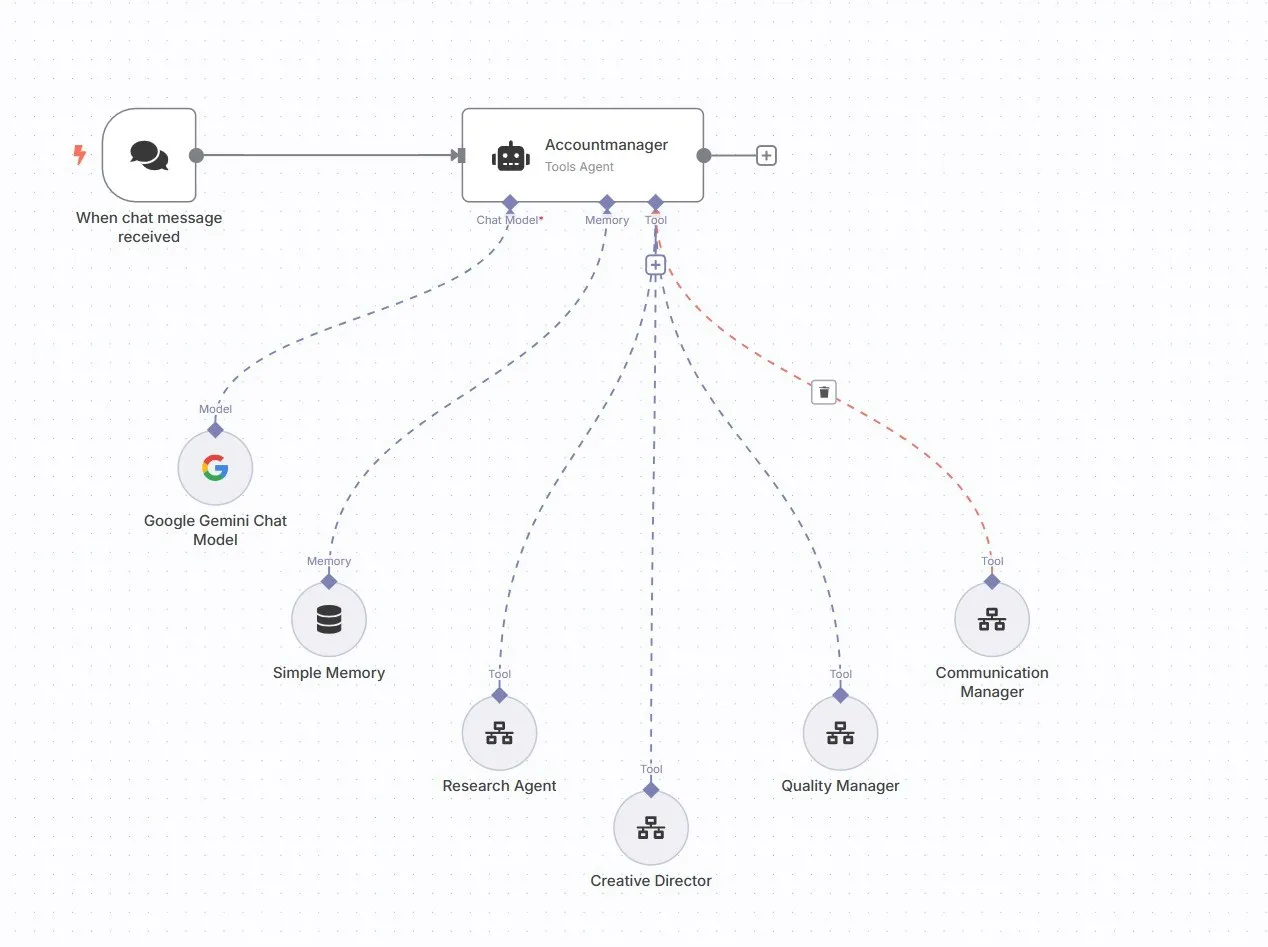
- AI agents: connects to models from OpenAI, Anthropic and Google, among others. In the AI Agent node the model decides which tool to call, and an MCP Client node pulls in tools from MCP servers.
- Billing: n8n Cloud charges per workflow execution, however many steps it has. Self-hosting is free of licence fees, but not free: the servers and the upkeep are on you.
Make
- What it is: a visual automation platform in the cloud, where you build scenarios out of modules. Each organisation is set to a data zone in either the US or the EU.
- AI agents: an agent can use modules, whole scenarios, MCP tools and other agents as its tools. Make lists the new Make AI Agent as still being in open beta.
- Billing: in credits. For ordinary apps one operation is one credit; AI features use extra credits based on tokens.
Zapier
- What it is: the best-known platform for connecting SaaS apps, with integrations for more than 9,000 apps according to Zapier.
- AI agents: Zapier Agents carries out tasks across those apps, and Zapier MCP lets assistants such as Claude and ChatGPT take actions in your own apps.
- Billing: each successful action in a Zap counts as a separate task, and AI steps and code now fall under the same task model.
Power Automate
- What it is: Microsoft's automation platform, with three kinds of flow: cloud flows that run on a trigger or schedule, desktop flows, and generative actions where AI picks the steps (still in preview).
- RPA: desktop flows are Microsoft's take on RPA. They can automate legacy applications with no API by mimicking mouse and keyboard input. Combining RPA, workflows and AI is often called hyperautomation.
- Licensing: Microsoft 365 includes a limited set of features. Premium connectors and RPA need Power Automate Premium; bots that run without a person present need a Process licence or pay-as-you-go.
Copilot Studio
- What it is: Microsoft's graphical, low-code studio for building agents and workflows, connecting them to your data and publishing them to Teams, Microsoft Copilot, your website and other channels.
- Connections: Power Platform connectors, custom connectors and MCP servers.
- Billing: usage is charged in Copilot Credits. For what Microsoft 365 Copilot itself does and does not do, see our piece on Microsoft 365 Copilot.
Self-hosted or SaaS: where does your data live?
Under the GDPR, the first question is where your data is processed and who is responsible for it. This is where the platforms genuinely differ.
- n8n, self-hosted: the data flowing through your workflows stays on your own infrastructure, and n8n is neither controller nor processor for it. You do take on updates, security and deleting personal data. Telemetry to n8n is on by default; you have to switch it off yourself.
- n8n Cloud: runs on Microsoft Azure, with the hardware and stored data hosted in the European Union, according to n8n.
- Make: with an EU data zone, most processing stays in the EU. Make itself warns, though, that a handful of AI features always route through the US, and that bringing your own OpenAI or Anthropic connection removes the EU guarantee.
- Zapier: stores data on AWS servers in the United States and offers no EU-only storage option. Zapier is certified under the EU-US Data Privacy Framework.
- Copilot Studio: customer data stays in the Azure geography you choose, with European datacentres in the Netherlands and Ireland among others. Microsoft does list exceptions, such as external services and channels you connect yourself.
One point is easily missed: self-hosting says nothing about the language model your workflow calls. If your self-hosted n8n sends a customer file to a model in the US, that file still ends up in the US. If you want control over the whole chain, that is what sovereign AI means. See also company data, AI and the GDPR.
Where low-code shines
Credit where it is due, because there is plenty. You can connect a form, a CRM and a mailbox without a development project. Authentication and error handling for well-known apps are already taken care of. You can test whether an AI step adds value before investing properly. And with desktop flows you can even automate an application that has no API.
Where low-code runs out
The limits rarely show with the first flow. They show with the twentieth, or the moment a flow becomes business-critical. These are the six pressure points.
1. Complex logic
A process with lots of exceptions turns into a tangle of branches, filters and code snippets in a visual editor, until the flow is harder to read than the code it replaced. At that point the process is asking for a different form.
2. Version control and environments
Software should have separate test and production environments and a history of every change. With low-code, that does not come for free. In n8n, Git-based version control and environments are only available on the Business and Enterprise plans. Make keeps saved versions per scenario, which is not the same as a release pipeline. In the Microsoft world it runs through solutions, and every environment in that chain needs a Dataverse database.
3. Testing
An AI step does not give the same answer every time. So you need a fixed set of test cases to check that results hold up when you change a prompt or model: an eval. n8n has evaluations for this, and so does Copilot Studio. But someone has to write those test cases and run them on every change, and with quickly built flows that rarely happens.
4. Monitoring and administration
Who notices when a flow stops overnight because an API changed? A lightweight integration can then fail silently. Logging and alerts are yours to set up, and some admin features sit in the pricier tiers: in Make, audit logs are Enterprise only. In Microsoft environments, admins use data policies to control which connectors staff can use. Good governance, but someone has to do it.
5. Ownership when the builder leaves
A familiar story: one keen colleague builds forty flows under their personal account. They leave, and nobody knows what any of them does. It is the automation version of shadow AI. For every automation, record who owns it, which service account it runs under and where the documentation lives. That is part of AI governance.
6. Cost at scale
With Zapier and Make the bill grows with every step in a flow; Copilot Studio charges in credits and n8n Cloud per execution. At a few hundred runs a month you will barely notice. At tens of thousands of runs with AI steps, you will. Self-hosting removes the usage fees but costs servers, upkeep and hours. Run the numbers for your own volumes.
When bespoke software or an integration layer fits better
Bespoke is not automatically better: it costs more up front and needs someone to maintain it. It pays off when two or more of these apply:
- the automation touches customer data or special category personal data;
- the process runs through three or more core systems, such as your ERP, CRM and accounting package;
- a system has no standard connector, or not even a public API;
- several agents need to work together and check each other's output, a multi-agent system;
- you want changes in Git, automated tests and a proper release process;
- volumes are high enough that usage fees become the deciding factor.
Often the answer is not a standalone app but an integration layer: middleware that connects your systems properly once, validates the data and logs what was exchanged. Agents, dashboards and plain n8n flows can then run on top, without each flow maintaining its own connection to your ERP. That is how we approach system integration, and one step further, an AIOS: an AI layer on your own data. If you need an application of your own, that becomes custom AI software. For how MCP fits in, read MCP explained.
How we use these tools
We start with the process, not the tool. Once it is clear where the time and the errors are, we choose the right form for each step: an AI agent, an integration or bespoke software. Sometimes that is simply n8n.
For LAB63, an AI marketing agency in Antwerp, we built a modular n8n workflow for strategy projects. After the kick-off, five researcher agents investigate brand, market, people, society and media in parallel; a strategist agent then writes the synthesis and a copywriter agent turns it into a report. LAB63's strategist still makes the calls. The result: typically three to five days of strategy work saved per assignment. n8n was a good fit here: fixed steps, a team that reviews the output itself, and no core system that falls over if something goes wrong.
Sometimes the pragmatic choice is not to automate everything. At In het Veld, FacilityApps had no public API yet. So AI prepares the insights from each conversation and a team member checks them before they go in: human-in-the-loop by design. And for United Lease's WhatsApp agent, which puts qualified leads straight into the CRM, the integration matters as much as the agent.
Quick guide: which platform for which situation?
- You work in Microsoft 365 and want agents in Teams: Copilot Studio, with Power Automate handling the flows behind it.
- A legacy desktop application with no API: desktop flows in Power Automate.
- A few SaaS apps, low volumes, no sensitive data: Zapier or Make.
- Data must stay on your own servers and you have technical people: self-hosted n8n.
- Business-critical, several core systems, customer data and AI that has to be right: an integration layer or bespoke software, possibly with a workflow tool on top. See AI automation.
Frequently asked questions
Is n8n open source?
No, not by the usual definition, and n8n does not describe itself that way. The source code is available under the Sustainable Use License, with enterprise features under a separate Enterprise License. You can use and modify n8n free of charge for your own internal business purposes. Without a separate agreement, you cannot offer n8n to your customers so they can build their own workflows in it. Building workflows for clients as a service provider is allowed.
n8n or Zapier?
Zapier is quicker to set up and needs no technical knowledge. n8n gives you more control (self-hosting, your own code, complex flows) but asks more of your team. If your data must be stored in the EU only, Zapier is out, because it does not offer that option.
n8n or Make?
Both are visual and both handle complex logic. The biggest difference is hosting: Make is a cloud service with an EU or US data zone, while n8n can also be self-hosted. Make is often easier for non-technical teams; n8n leaves more room for your own code.
What is the difference between Copilot Studio and Power Automate?
Power Automate automates steps: cloud flows, desktop flows and RPA. Copilot Studio builds agents that understand a request, draw on knowledge and choose a tool themselves. Copilot Studio also has its own agent flows, which feel similar to Power Automate and can be attached to an agent as a tool.
Can you build AI agents with n8n?
Yes. You connect the AI Agent node to a language model, tools and memory, and you can require human approval for specific tools before the agent uses them. That is how five researcher agents work side by side for LAB63. Before going into production, test the output with evaluations and agree who owns the flow.
Where do you start?
With the process, not the tool. In an AI audit we map where the time goes and which step calls for a workflow tool, an agent or an integration. If you already use n8n, Make or Power Automate, we build on it where that makes sense.